
for LinkedIn.
Create professional headshots for LinkedIn, your résumé and company bio from one clear selfie. Choose the background, wardrobe and finish — AI handles the photoshoot while keeping you recognizable.
LinkedIn profiles
Résumés & CVs
Company directories
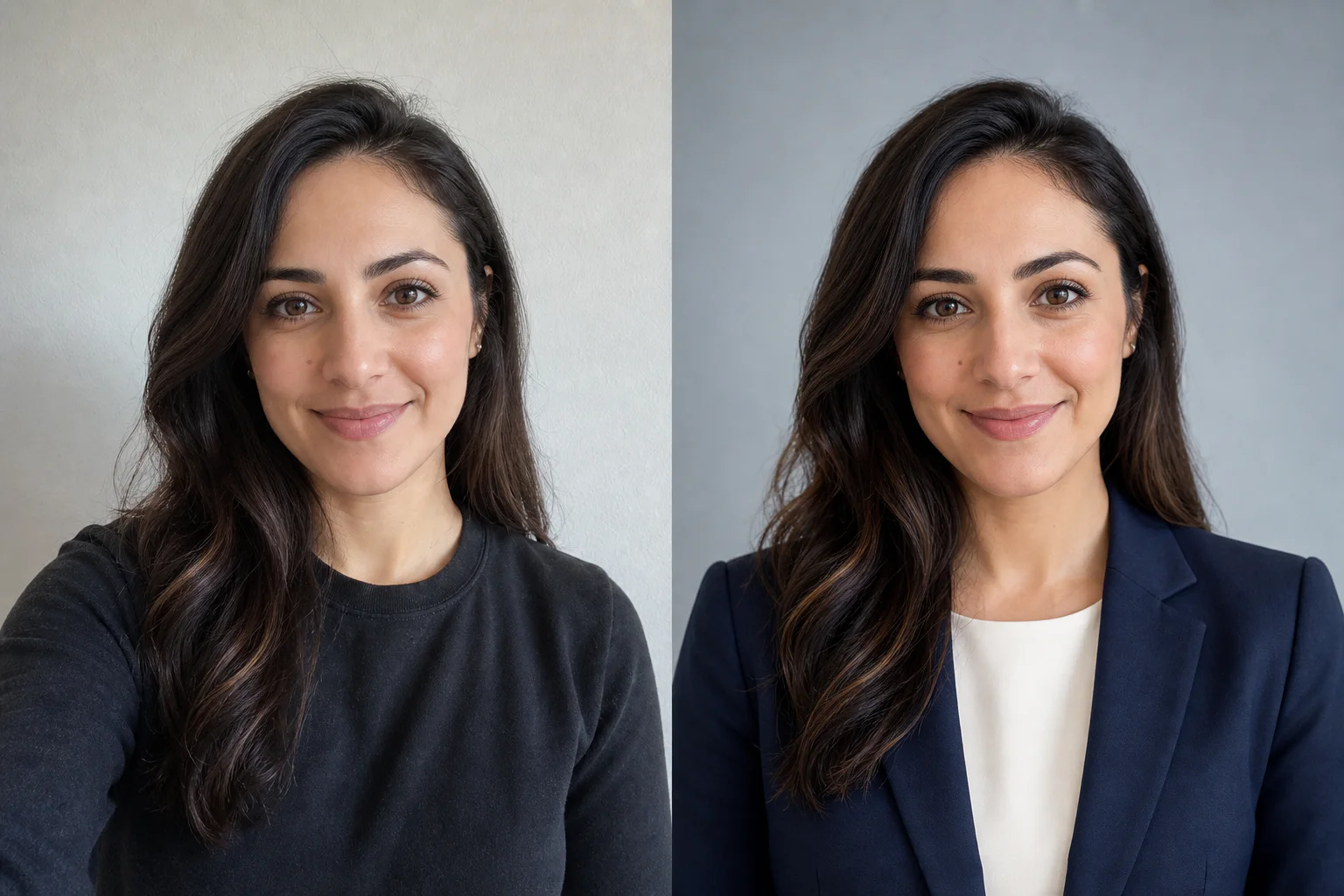 Original selfieAI LinkedIn headshot
photo to start
professional controls
LinkedIn profile crop
studio bookings
A strong AI headshot should make the real you look clear, current and credible at profile-picture size — never like a different person.
Facial structure, age, skin texture and distinctive features stay yours. Professional headshots for LinkedIn should polish the presentation, not replace the person.
Balanced head-and-shoulders framing keeps your face visible inside LinkedIn’s circular profile crop on desktop and mobile.
Pick formal, business-casual or creative wardrobe and pair it with a background that supports your field instead of distracting from it.
Every backdrop keeps attention on your face while giving your professional LinkedIn photo a different tone.
Use a recent photo with one visible face, natural light and no heavy filters. A phone photo is enough.
Choose the background, wardrobe, crop, expression, lighting and retouching for your LinkedIn headshots. Every setting is visible before you generate.
Create a square, profile-ready AI headshot and download the full-resolution result for LinkedIn, your résumé or your team page.
Your upload is used only to create your result and is never shown publicly.
Read the privacy policyUpload a recent, sharp photo with one clearly visible face, choose your professional settings and generate. A phone selfie with even light is enough; avoid sunglasses, beauty filters and anything covering the hairline or jaw.
That is the priority. The headshot prompt locks identity, age and distinctive facial features while changing only the professional presentation around them. As with any generative tool, review the final portrait and regenerate if a detail is not true to you.
Yes, provided the result is an honest current representation of you. For professional headshots for LinkedIn, use natural retouching and avoid changes that could misrepresent your identity, role or credentials.
Light grey is the safest all-purpose choice. Warm ivory feels more approachable, slate blue adds authority and a softly blurred office gives subtle work context without visual clutter.
Yes. Keep your current outfit or choose business formal, business casual or a creative-professional direction. The tool avoids logos, costumes and overly trend-led styling.
The tool requests a square 1:1 portrait designed to survive LinkedIn’s circular crop. Download the full result, then upload it directly to your profile or resize it for a résumé and company directory.
Natural is the best default for LinkedIn: it preserves pores, freckles, lines and age. Polished adds light professional cleanup while keeping realistic skin texture.
Your upload is used to generate your result and is not shown publicly. Upload only photos you own or have permission to edit, and read the privacy policy for full handling details.
Set the professional tone, generate your AI headshots and download a LinkedIn-ready result in minutes.
Create LinkedIn headshots